Short Notes: All about TLS
How do you 'trust' something on the internet?
What is TLS (or SSL)
- Secure Sockets Layer (SSL) & Transport Layer Security (TLS)
- SSL is deprecated now, TLS is in use now but both names are still used interchangably .
- TLS is an encryption and authentication protocol designed to secure Internet communications.
- TLS handshake is the process of creating a safe and secure encrypted communication channel between the client and the server.
- During a TLS handshake, the two communicating sides exchange messages to acknowledge each other, verify each other, establish the cryptographic algorithms they will use, and agree on session keys.
- The TLS protocol uses asymmetric cryptography to exchange keys at the beginning and then switch to symmetric keys (“sessions keys”) from then on in a process known as the TLS handshake.
- But how can your browser be sure the server’s public key really belongs to that domain? Use TLS certificates to help verify the identity of the server you’re connecting to.
Useful Terminologies
-
Cipher Suite
- A cipher suite is a collection of cryptographic algorithms used to establish a secure connection between the client and server.
- During the SSL/TLS handshake, both the client and host computer agree upon an encryption method from the cipher suites to create keys and encrypt information.
- The cipher suite contains digital signature algorithms, hash functions for checking if the data in transit is modified, asymmetric encryption algorithms for the handshake, and symmetric encryption algorithm to maintain session security.
-
Key Exchange
- TLS key exchange allows two parties to use a cryptographic algorithm by exchanging cryptographic keys.
- RSA and Diffie-Hellman-Merkle are the top key exchange algorithms used.
-
Symmetric Encryption
- Symmetric encryption encrypts and decrypts using the same (one) key.
- This is more efficient – it needs less encryption time, uses fewer resources, and can transfer large volumes of data, while also maintaining confidentiality.
- Examples: Data Encryption Standard (
DES), Triple Data Encryption Standard (3DES), Advanced Encryption Standard (AES) etc.
-
Asymmetric Encryption
- Asymmetric encryption uses two keys: a public and a private key.
- A message encrypted with a public key can only be decrypted with the corresponding private key.
- It provides better security as the keys are never shared and allow the user to authenticate data using digital signatures.
- The “strength” of asymmetrical cryptography relies on modular arithmetic, mathematical operations that are very hard to do in the opposite direction.
- It is slower than symmetric encryption and can only be utilized for small amounts of data.
- Examples: Rivest Shamir Adleman (
RSA), Digital Signature Algorithm (DSA), the Diffie-Hellman exchange method etc.
-
SSL Certificate
- The SSL certificates are issued by trusted certification authorities who ensure that no one (without the right encoding/decoding keys) can read the data being shared between a user and the server.
SSL/TLS Certificate
An SSL certificate consists of following information:
- Domain Name
- Associated Subdomains
- Name of Organization the cert is issued to
- Issuing Authority Name: issued by certificate authorities (CAs)
- Certificate Authority’s Digital Signature
- Date of Issue and Expiration Date
- Public Key
Why trust the certificate authorities?
As CAs are responsible for verifying that the data you received came from the server you expected, they play an essential role in the internet. There are many precautions that CAs take to ensure the security of the certificate issuance process. For example, CAs store the private keys in a hardware security module so they can’t be extracted.
The trust model of TLS relies on two major elements:
- Root certificates (also known as trusted roots)
- The server’s certificate
Root CAs have self-signed certificates. There’s no other entity in their certificate chain. The browser automatically trusts any certificates issued by a CA, provided the CA’s root certificate is installed in the certificate store of your device. Every device has a certificate store, a local collection of root certificates from trusted CAs. Only CAs that can demonstrate that they adhere to the policies set by the CA/Browser Forum are trusted by root certificate stores.
To ensure the validity of certificates and prevent them from being mistakenly or fraudulently issued, all CAs post the certificates they generate on public log servers known as Certificate Transparency (CT) logs. These servers send a signature to the CA promising to publish their certificate.
Note
Every certificate in the “WebPKI” (the Web’s Public Key Infrastructure) has certain technical limitations imposed on it. These are represented generally by the "keyUsage", "extendedKeyUsage", and "basicConstraints" fields of the certificate.
The basicConstraints field determines whether that certificate (or rather, the keypair represented by that certificate) is allowed to issue other certificates at all. In cert issued by Let’s Encrypt, it says:
            X509v3 Basic Constraints: critical
                CA:FALSE
This means “nope, not allowed to issue any certificates”. This is the same for every certificate that Let’s Encrypt issues to subscribers.
Compare this with the R3 intermediate that Let’s Encrypt uses to issue those end-entity certificates:
            X509v3 Basic Constraints: critical
                CA:TRUE, pathlen:0
How a TLS connection is created
TLS v1.2 Handshake
- TLS 1.2 can be configured to use many key exchange algorithms, and among them, the most well-known and widely used is the
RSAkey exchange algorithm.
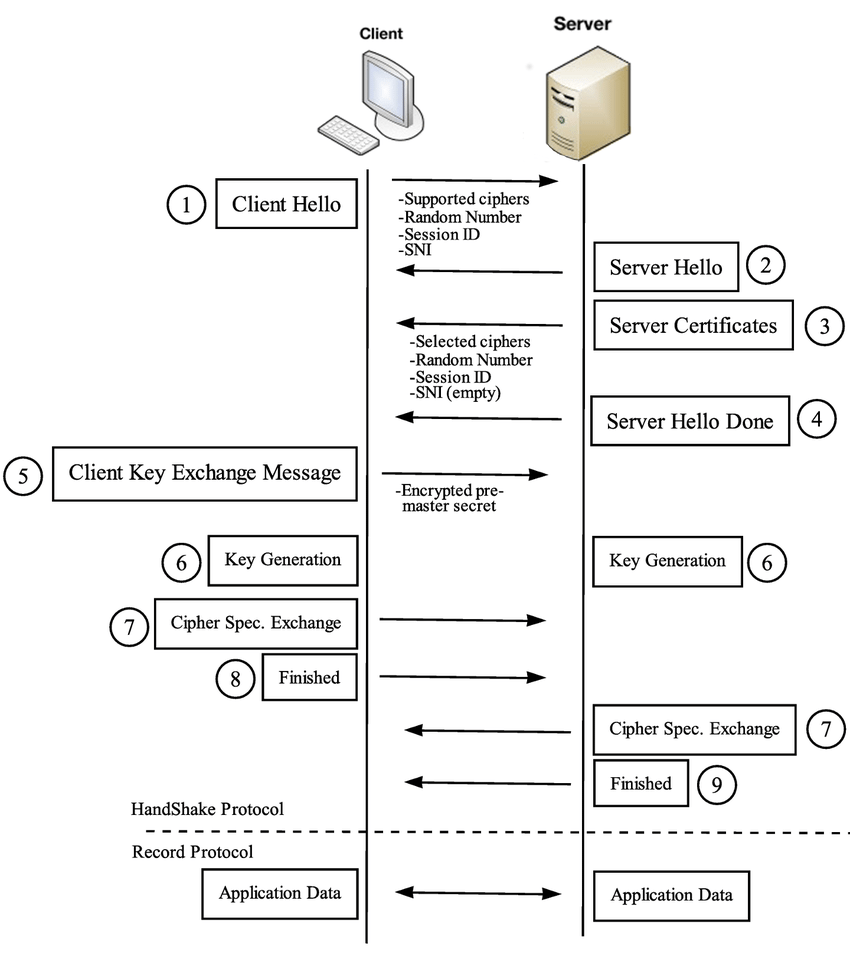
The RSA key exchange works roughly as follows in TLS v1.2:
- Server listens for new connections on port 443.
- Client connects to port 443 and initiates the handshake process with a ClientHello message to the server. This message contains the TLS versions and cipher suites the client supports and a 32-byte random number known as “Client Random”.
- Server says “hello” back with a ServerHello message. The server selects a cipher and the TLS version from the list provided by the client, then generates a different 32-byte random number known as “Server Random” and sends it all back along with the server’s own SSL certificate.
- Client uses the SSL certificate to verify the server’s identity. SSL certificates contain a public key generated by the server and a digital signature signed with the private key of a trusted third party known as a certificate authority (CA). Most web browsers and operating systems come bundled with public keys from trusted CAs, which are used to verify that the CA issued the certificate.
- The client verifies the server has the matching private key to the certificate through ClientKeyExchange. The client generates the pre-master secret (a 48-byte random number) and encrypts it with the server’s public key obtained from the certificate. If the server is the true owner of the certificate, it must be able to decrypt the message and obtain the original
pre-master secret. - Server decrypts the pre-master secret. Now both the server and client have the
pre-master secret, theServer Random, and theClient Random. They can use that to derive the master secret using the previously agreed cipher and arrive at the same (symmetric) key, which will become the session key once both parties verify their keys match. - Client sends a ChangeCipherSpec message. This indicates that the client is ready to create the session key and start communicating through an encrypted tunnel using that key.
- Client proves to server it has the correct keys. The client hashes all handshake records up to that point, encrypts them with the session key, and sends them to the server. If the server generates the correct key, it will be able to decrypt that message and verify the record hashes (which the server can independently generate).
- Server proves to the client that it has the correct keys. The server does the same thing and sends it to the client.
- A secure connection is established. If both keys match, the TLS handshake is complete.
Problems with TLS v1.2
- TLS v1.2 left a lot of its configuration parameters up to the users, which often resulted in bad choices.
- Additionally, in the name of backward compatibility, TLS v1.2 also allowed old, insecure ciphers to be used.
- On top of all that, the RSA key exchange has a few weaknesses:
- The same public-private key pair is used both to authenticate the server and to encrypt the pre-master secret. If an attacker obtains the private key, they will be able to re-generate the session keys and be to decrypt the entire session.
- There is no Perfect Forward Secrecy (PFS). Since the server’s private key doesn’t change, an attacker might record and store encrypted data for years, hoping to decrypt it years down the line if the server’s private key is ever leaked or compromised.
- Performance. It’s necessary to make two round trips between the client and server until the session key is established.
To address these problems, the IETF began developing TLS 1.3 in 2013 and finally released it to the public in August 2018.
What changed in TLS v1.3
In practice, the main differences between TLS v1.3 and v1.2 are:
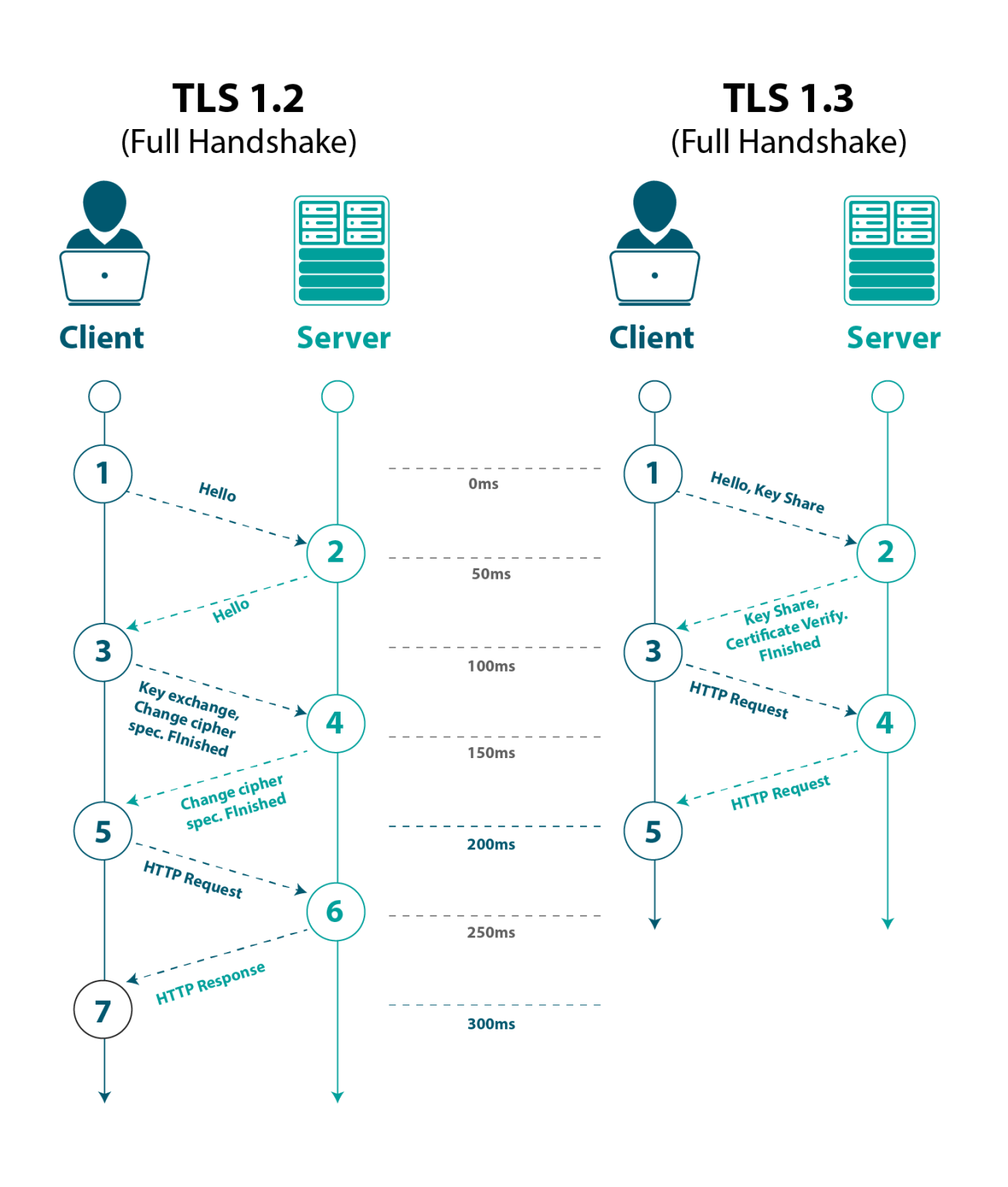
- Shorter handshake
- Only supports key exchange algorithms with perfect forward secrecy (PFS), such as ephemeral Diffie-Hellman
- Support for
0-RTT(Zero Round Trip Time) resumption
This represents a bit of a paradigm change in TLS v1.3: shifting the focus from user configurability and backward compatibility to security by being more opinionated.
This allowed the designers to create a shorter handshake (by restraining DH as the only key exchange algorithm) but also prevented developers from choosing insecure options by restricting the number of options available in the first place. For example, while it was technically possible to use DH as the key exchange method in TLS v1.2, the participants were responsible for setting the DH parameters. Picking the right parameters is crucial to make sure the DH exchange is secure, as some parameters can be trivially broken.
TLS v1.3 makes it impossible to use anything but a set of DH parameters that are believed to be secure.
The TLS v1.3 handshake
-
Server listens for new connections on port 443.
-
Client connects to port 443 and initiates the handshake process with a ClientHello message to the server. Since the list of cipher suites was vastly reduced in TLS v1.3, the client assumes the server is going to use one of the five. It proactively calculates a key pair for each of the cipher suites and sends it to the server along with the protocol version.
-
Server calculates the key session. With the client’s key share, the server is able to generate the session key.
-
Server says “hello” back with a ServerHello message. The server generates its own key share and sends it over to the client, so it also can generate the session key, along with the server’s encrypted SSL certificate (using the session key created on #3).
-
Client generates master secret and a secure connection is established. The client receives the server’s key share and calculates the session key. It decrypts and verifies the server’s certificates, and if everything is good, the handshake is complete.
-
There are two different public-private key pairs on an ephemeral DH exchange: the first is the ephemeral pair, created every time client and server establish a connection, which guarantees forward secrecy. The second pair, embedded on the SSL certificate, is used for authentication and doesn’t change.
-
Given that a new key is generated for every session, this feature guarantees Perfect Forward Secrecy. If the encryption keys are compromised at a later date, the leaked key will only be able to decrypt the specific session to which it corresponds; all the prior sessions are still safe.
Mutual TLS (mTLS)
Mutual TLS (mTLS) is a is a method for mutual authentication. It is a type of authentication in which the two parties in a connection authenticate each other using the TLS protocol. mTLS is often used in a Zero Trust security framework to verify users, devices, and servers within an organization. It can also help keep APIs secure. Zero Trust means that no user, device, or network traffic is trusted by default, an approach that helps eliminate many security vulnerabilities.
How does mTLS work?
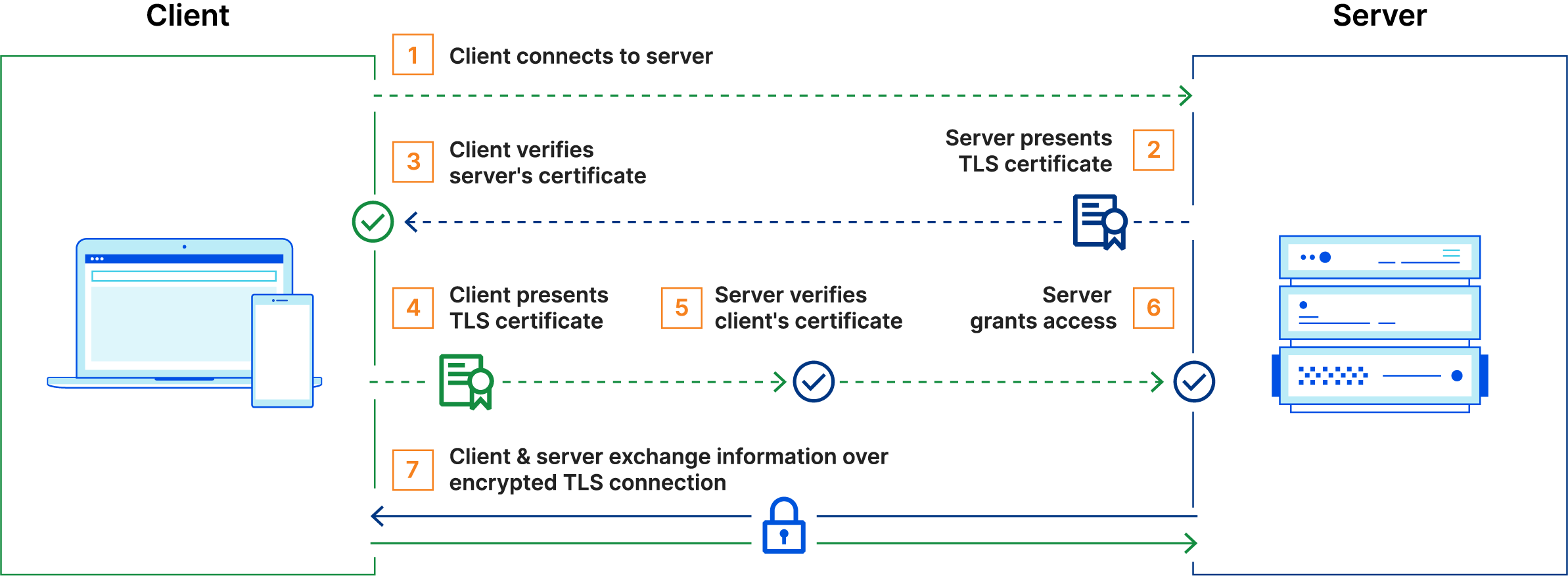
Normally in TLS, the server has a TLS certificate and a public/private key pair, while the client does not. In mTLS, however, both the client and server have a certificate, and both sides authenticate using their public/private key pair. Compared to regular TLS, there are additional steps in mTLS to verify both parties (additional steps in bold):
- Client connects to server
- Server presents its TLS certificate
- Client verifies the server’s certificate
- Client presents its TLS certificate
- Server verifies the client’s certificate
- Server grants access
- Client and server exchange information over encrypted TLS connection
Certificate authorities in mTLS
- The organization implementing mTLS acts as its own certificate authority. This contrasts with standard TLS, in which the certificate authority is an external organization.
- A “root” TLS certificate is necessary for mTLS; this enables an organization to be their own certificate authority.
- The certificates used by authorized clients and servers have to correspond to this root certificate. The root certificate is self-signed, meaning that the organization creates it themselves.
Why mTLS
- mTLS helps ensure that traffic is secure and trusted in both directions between a client and server, provides an additional layer of security.
- mTLS prevents various kinds of attacks, including:
- On-path attacks: On-path attackers place themselves between a client and a server and intercept or modify communications between the two. When mTLS is used, on-path attackers cannot authenticate to either the client or the server, making this attack almost impossible to carry out.
- Spoofing attacks: Attackers can attempt to “spoof” (imitate) a web server to a user, or vice versa. Spoofing attacks are far more difficult when both sides have to authenticate with TLS certificates.
- Credential stuffing: Attackers use leaked sets of credentials from a data breach to try to log in as a legitimate user. Without a legitimately issued TLS certificate, credential stuffing attacks cannot be successful against organizations that use mTLS.
- Brute force attacks: Typically carried out with bots, a brute force attack is when an attacker uses rapid trial and error to guess a user’s password. mTLS ensures that a password is not enough to gain access to an organization’s network.
- Phishing attacks: The goal of a phishing attack is often to steal user credentials, then use those credentials to compromise a network or an application. Even if a user falls for such an attack, the attacker still needs a TLS certificate and a corresponding private key in order to use those credentials.
- Malicious API requests: When used for API security, mTLS ensures that API requests come from legitimate, authenticated users only. This stops attackers from sending malicious API requests that aim to exploit a vulnerability or subvert the way the API is supposed to function.

Share this post
Twitter
Facebook
Reddit
LinkedIn
Email