Short Notes: Data Link Layer
Inner workings to the Data Link Layer, the 'L2' protocol suite.
Address Translation (ARP)
IP datagrams contain IP addresses, but the physical interface hardware on the host or router to which you want to send the datagram only understands the addressing scheme of that particular network. Thus, we need to translate the IP address to a link-level address that makes sense on this network (a 48-bit Ethernet address). We can then encapsulate the IP datagram inside a frame that contains that link-level address and send it either to the ultimate destination or to a router that promises to forward the datagram toward the ultimate destination.
The goal of ARP is to enable each host on a network to build up a table of mappings between IP addresses and link-level addresses. Since these mappings may change over time, the entries are timed out periodically and removed. This happens on the order of every 15 minutes. The set of mappings currently stored in a host is known as the ARP cache or ARP table.
The address resolution process is as follows:
- If a host wants to send an IP datagram to a host (or router) that it knows to be on the same network, it first checks for a mapping in the cache. If no mapping is found, it needs to invoke the Address Resolution Protocol over the network.
- It does this by broadcasting an ARP query onto the network. This query contains the IP address in question (the target IP address). Each host receives the query and checks to see if it matches its IP address.
- If it does match, the host sends a response message that contains its link-layer address back to the originator of the query. The originator adds the information contained in this response to its ARP table.
- The query message also includes the IP address and link-layer address of the sending host. Thus, when a host broadcasts a query message, each host on the network can learn the sender’s link-level and IP addresses and place that information in its ARP table. However, not every host adds this information to its ARP table.
- If that host is the target of the query, then it adds the information about the sender to its table. This is because there is a good chance that the source host is about to send it an application-level message, and it may eventually have to send a response or ACK back to the source
- If a host is not the target and does not already have an entry for the source in its ARP table, then it does not add an entry for the source. This is because there is no reason to believe that this host will ever need the source’s link-level address; there is no need to clutter its ARP table with this information.
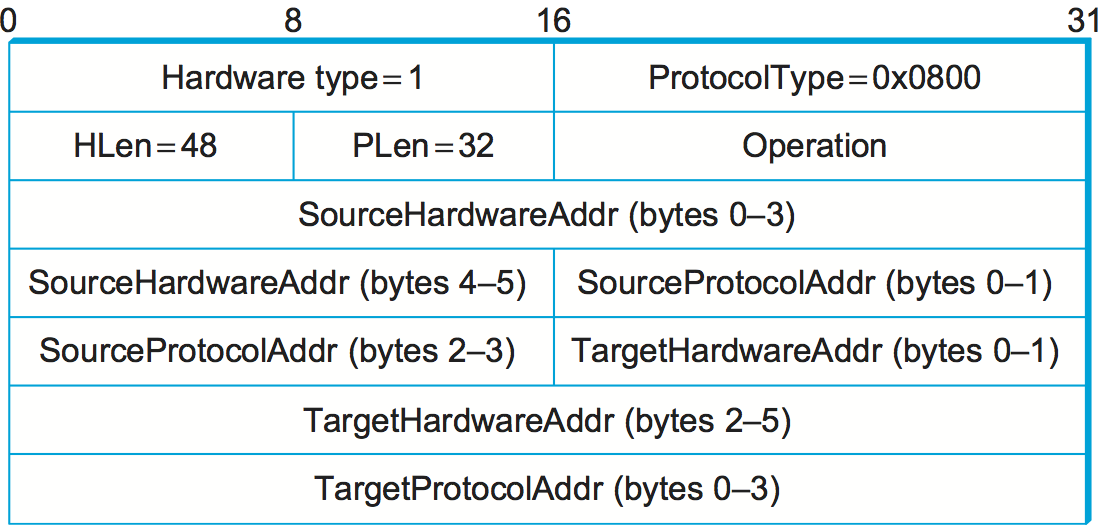
HardwareType: specifies the type of physical network (e.g., Ethernet)ProtocolType: specifies the higher-layer protocol (e.g., IP)HLen(“hardware” address length) andPLen(“protocol” address length): specify the length of the link-layer address and higher-layer protocol address respectively.Operation: specifies whether this is a request or a responsesourceandtargethardware (Ethernet) and protocol (IP) addresses.
Host Configuration (DHCP)
A host needs to have an IP address to be able to be a part of the “internet”. There are also some other pieces of information a host needs to have before it can start sending packets. The most notable of these is the address of a default router — the place to which it can send packets whose destination address is not on the same network as the sending host. An automated configuration method is used for this, using a protocol known as the Dynamic Host Configuration Protocol (DHCP).
DHCP relies on the existence of a DHCP server that is responsible for providing configuration information to hosts. There is at least one DHCP server for an administrative domain. At the simplest level, the DHCP server can function just as a centralized repository for host configuration information.
DHCP server maintains a pool of available addresses that it hands out to hosts on demand. This considerably reduces the amount of configuration an administrator must do, since now it is only necessary to allocate a range of IP addresses to each network.
Since the goal of DHCP is to minimize the amount of manual configuration required for a host to function, it would rather defeat the purpose if each host had to be configured with the address of a DHCP server. Thus, the first problem faced by DHCP is that of server discovery.
- To contact a DHCP server, a newly booted or attached host sends a
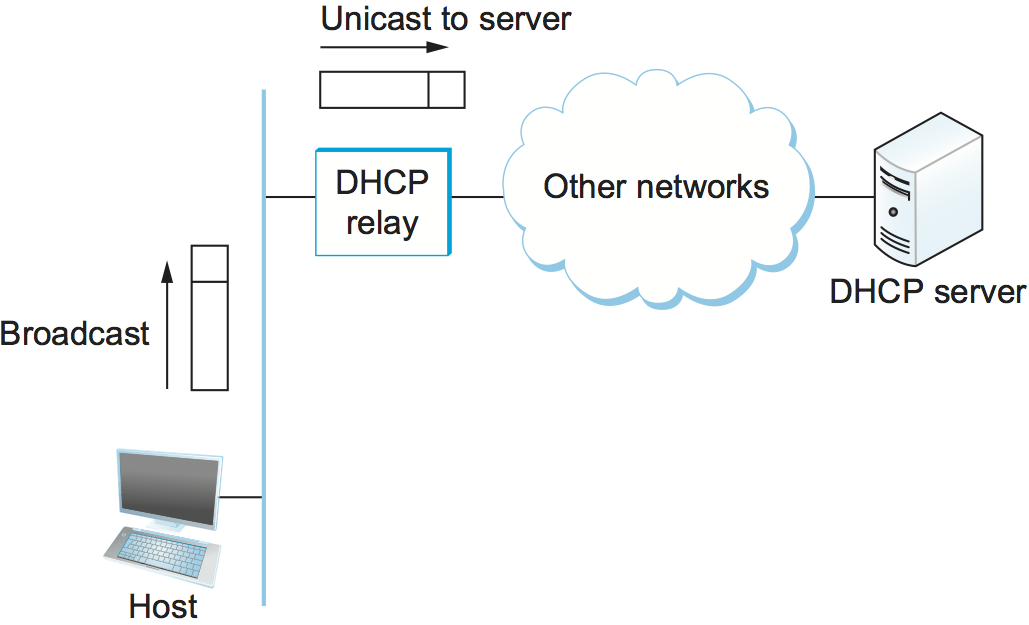
DHCPDISCOVERmessage to a255.255.255.255, the broadcast address. This means it will be received by all hosts and routers on that network. The message is sent using UDP. - Routers do not forward such packets onto other networks, preventing broadcast to the entire Internet.
- In the simplest case, one of these nodes is the DHCP server for the network. The server would then reply to the host that generated the discovery message (all the other nodes would ignore it).
- However, it is not really desirable to require one DHCP server on every network, because this still creates a potentially large number of servers that need to be correctly and consistently configured. Thus, DHCP uses the concept of a relay agent. There is at least one relay agent on each network, and it is configured with just one piece of information: the IP address of the DHCP server.
- When a relay agent receives a
DHCPDISCOVERmessage, it unicasts it to the DHCP server and awaits the response, which it will then send back to the requesting client.
- DHCP allows addresses to be leased for some period of time. Once the lease expires, the server is free to return that address to its pool. A host with a leased address needs to renew the lease periodically if in fact it is still connected to the network and functioning correctly.
ICMP
IP is always configured with a companion protocol, known as the Internet Control Message Protocol (ICMP), that defines a collection of error messages that are sent back to the source host whenever a router or host is unable to process an IP datagram successfully.
ICMP also defines a handful of control messages that a router can send back to a source host. One of the most useful control messages, called an ICMP-Redirect, tells the source host that there is a better route to the destination. Suppose a host is connected to a network that has two routers attached to it, called R1 and R2, where the host uses R1 as its default router. Should R1 ever receive a datagram from the host, where based on its forwarding table it knows that R2 would have been a better choice for a particular destination address, it sends an ICMP-Redirect back to the host, instructing it to use R2 for all future datagrams addressed to that destination. The host then adds this new route to its forwarding table.
Virtual Networks and Tunnels
Corporations with many sites often build private networks by leasing circuits from the phone companies and using those lines to interconnect sites. In such a network, communication is restricted to take place only among the sites of that corporation, which is often desirable for security reasons. To make a private network virtual, the leased transmission lines—which are not shared with any other corporations—would be replaced by some sort of shared network. This can be achieved by using an IP Tunnel.
- We can think of an IP tunnel as a virtual point-to-point link between a pair of nodes that are actually separated by an arbitrary number of networks. The virtual link is created within the router at the entrance to the tunnel by providing it with the IP address of the router at the far end of the tunnel.
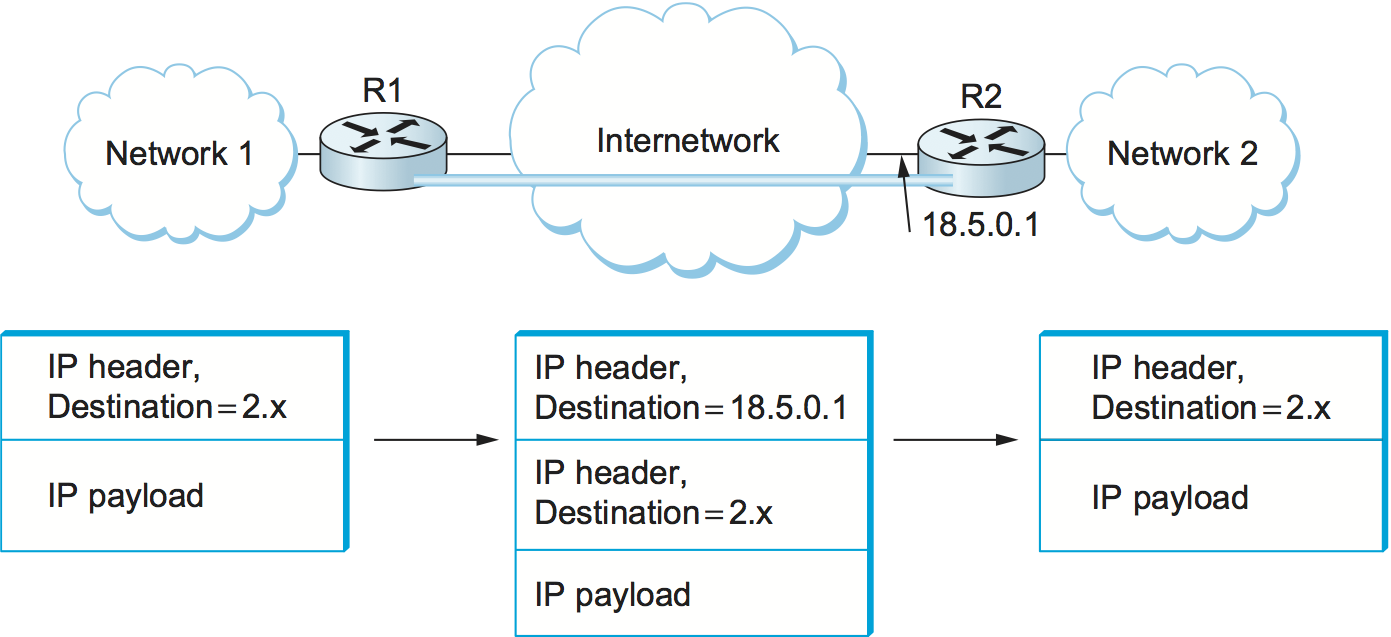
- Whenever the router at the entrance of the tunnel wants to send a packet over this virtual link, it encapsulates the packet inside an IP datagram. The destination address in the IP header is the address of the router at the far end of the tunnel, while the source address is that of the encapsulating router.
-
R1 has two physical interfaces. Interface 0 connects to network 1; interface 1 connects to a large internetwork and is thus the default for all traffic. In addition, R1 has a virtual interface, which is the interface to the tunnel. Suppose R1 receives a packet from network 1 that contains an address in network 2. The forwarding table says this packet should be sent out virtual interface 0. In order to send a packet out this interface, the router takes the packet, adds an IP header addressed to R2, and then proceeds to forward the packet as if it had just been received. R2’s address is 18.5.0.1; since the network number of this address is 18, not 1 or 2, a packet destined for R2 will be forwarded out the default interface into the internetwork.
-
Once the packet leaves R1, it looks to the rest of the world like a normal IP packet destined to R2, and it is forwarded accordingly. All the routers in the internetwork forward it using normal means, until it arrives at R2.
-
When R2 receives the packet, it finds that it carries its own address, so it removes the IP header and looks at the payload of the packet. What it finds is an inner IP packet whose destination address is in network 2. R2 now processes this packet like any other IP packet it receives. Since R2 is directly connected to network 2, it forwards the packet on to that network. Figure 83 shows the change in encapsulation of the packet as it moves across the network.
-
While R2 is acting as the endpoint of the tunnel, there is nothing to prevent it from performing the normal functions of a router. For example, it might receive some packets that are not tunneled, but that are addressed to networks that it knows how to reach, and it would forward them in the normal way.
Pros
- Security: Supplemented with encryption, a tunnel can become a very private sort of link across a public network.
- R1 and R2 have some capabilities that are not widely available in the intervening networks, such as multicast routing. By connecting these routers with a tunnel, we can build a virtual network in which all the routers with this capability appear to be directly connected.
- Tunnels is to carry packets from protocols other than IP across an IP network.
Cons
- It increases the length of packets; this might represent a significant waste of bandwidth for short packets.
- Longer packets might be subject to fragmentation, which has its own set of drawbacks.
- Management cost for the administrative entity that is responsible for setting up the tunnels and making sure they are correctly handled by the routing protocols.

Share this post
Twitter
Facebook
Reddit
LinkedIn
Email