Short Notes: Process Management
How the OS actually manage multiple processes
What is a Process
- A process is a running instances of program.
- Shell is also a process: when you enter shell command, control passes from shell to new process, executes and then returns back to shell once the process exits.
- Every process has unique number:
pid. Every process also has a parent id:ppid(exceptinit). - For every process running in the system, the OS keeps a data sturucture that keeps all the things associated with the process. This includes things like Address Space, User IDs, environment, file descriptors, current/root directory etc.
Process Address Space structure
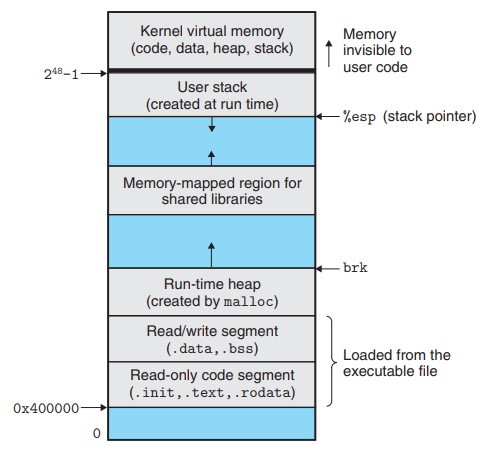
Stack
- Used for static memory allocation; local variables and return addresses are stored here.
- Allocated at top of memory.
- User doesn’t need to take care of the memory allocation and deallocation.
- Starts out empty at start of the program, and over the course can expand and shrink.
Heap
- Used for dynamic memory allocation.
- To use this space, we have to explicitly allocate it from the OS using the system calls to map the part of the address space to actual physical space.
- If code attempts to access unallocated portion of heap, memory error is generated.
- Remember CPU maps the virtual to the physical memory space using page tables, and any invalid triggers a CPU exception that runs some OS code which sends a signal to the process about the memory error.
mmap()is used by the process to request for heap memory. This adds some number of pages to the virtual address spaceand maps those pages to actual addresses in physical memory.munmap()does the opposite.- User needs to take care of the memory allocation and deallocation.
- We dont specify which memory to allocate, the OS generally finds out where that contiguous space is and allocates it to the process.
    address = mmap(1024)
    # calculations and actual code using this memory
    munmap(address)
mmap()fails when ther isn’t enough memory.- Why de-allocate memory? In large programs, you might run out of memory, or other process might not be able to use it. Rare nowadays as unused memory gets swapped. Still, it is a waste of resources.
- Garbage collection is present is most language which takes care of this automaticalkly.
Data
- Can be further divided into initialized and uninitialized data.
- Used for storing static/global variable
- Known as data segment as well.
- Size is fixed.
Code
- Used to store instrucctions in the program
- Also known as text segment.
- Size is fixed.
When an executable is executed, the executable specifies how large these sections need to be.
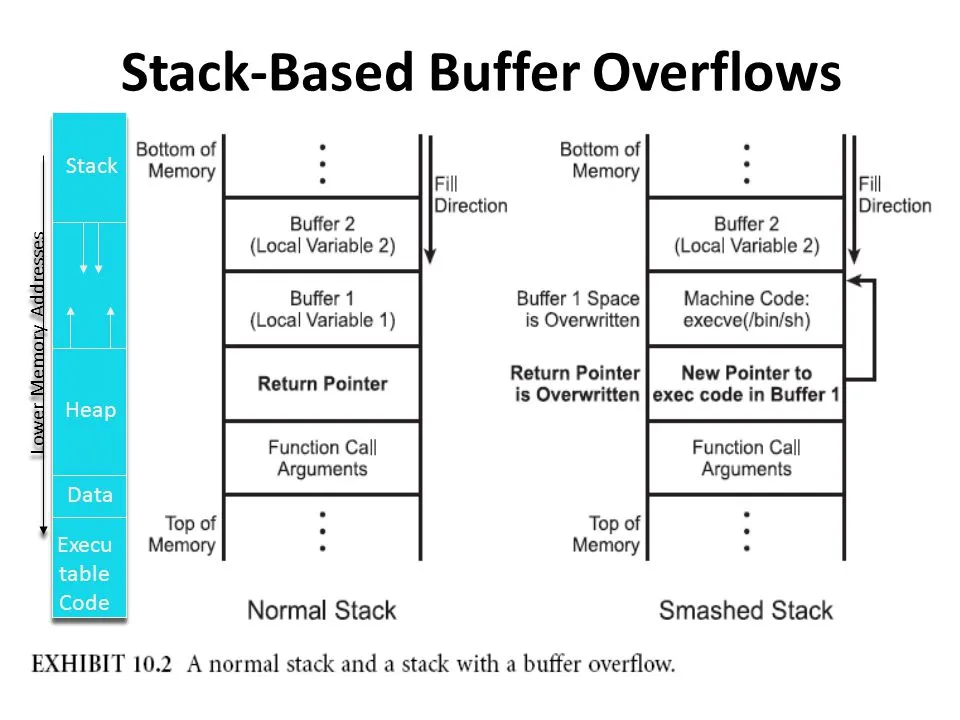
Stack Buffer Overflows
- The stack includes a return address. The return address is specified in the stack when a program contains a function call or again a subroutine. When the function is called, after its complete execution it has to return back to the original program. The return address contains the address of the instruction to return to.
- An attacker could use a buffer overflow to change the return address, allowing the attacker to run any arbitrary code on the system.
Some important Registers
- EBP - Base Pointer. Pointer to data on the stack (in the SS segment). It points to the bottom of the local variables.
- ESP - Stack Pointer (in the SS segment). It points to the top of the current stack frame. It is used to reference local variables.
- EIP - Instruction Pointer (holds the address of the next instruction to be executed)
Heap Overflow
- Heap overflows are a type of buffer overflow and actually very similar to stack based buffer overflows.
- The main difference is that it it not as straightforward to execute custom code. Since you’re overwriting information in the heap, you can’t simply overwrite the return address of a function to use shellcode
Create a Process
-
Using
system()system call.- Creates subprocess running standard shell
- passes command in this shell for execution
- uses
fork(2)to create a child process that executes the shell command specified in command usingexecl(3)as follows:execl("/bin/sh", "sh", "-c", command, (char *) 0); - slow, inefficient and has security risks.
-
Using
fork()andexec()system calls.- creates child process by making exact copy.
exec()immediately stops child process, new prog is loaded in its place, begins executing the new program.exec()will never return unless an error occurrs- this also has a ppid of the original process it was forked from.
-
When
fork()returns, both processes essentially start from the same place where the fork returns.- Only difference is what gets returned from the fork() system calls.
- In the main process, fork() returns the pid of the child process
- In the child process, the fork() returns 0.
-
fork()just copies the memory table, not the actual content in memory as it would be slow. In modern Linux kernels,fork()is actually implemented via theclone()system call. So the pages in memory for both processes are still mapped to the same portions in the RAM initially. The memory table of the fork is seprate, but has same mappings. Since both the processes point to the same pages in memory, the can read from the same page, but all the pages in the new program are maked as copy-on-write. -
Whenever the new process tries to write on that page, a CPU expception is raised. That triggers the OS to copy that page and update the page table to the new frame befire the write is allowed to go through.
-
This allows modern systems to cheaply
fork()new processes, as very small amount of pages are actually changed over the course of processes lifetime. The new process, still has the same code in its address space. To load a new program,exec*()system call is used. -
exec()discards the existing process' address space, and the new code is loaded, the data section is updated and the program henceforth is its own process. The machine code, data, heap, and stack of the process are replaced by those of the new program. The fork however retains most of the other resources like FDs and environment from the parent process. -
exit()system call is used to indicate the termination of program, 0 states it terminated normally. -
Parent process can read the status code from the child process. This is done by using the
wait()system call in the process. When a process invokeswait(), the process goes into a blocked state until the child process returns, at which point thewait()returns the exit code of child. -
Actually, the only system call is
execve()and all otherexec*functions are wrapping it. They all do essentially the same thing: loading a new program into the current process, and provide it with arguments and environment variables. The differences are in how the program is found, how the arguments are specified, and where the environment comes from.- The calls with
vin the name take an array parameter to specify theargv[]array of the new program. - The calls with
lin the name take the arguments of the new program as a variable-length argument list to the function itself. - The calls with
ein the name take an extra argument (or arguments in thelcase) to provide the environment of the new program; otherwise, the program inherits the current process’s environment. - The calls with
pin the name search thePATHenvironment variable to find the program if it doesn’t have a directory in it (i.e. it doesn’t contain a/character). Otherwise, the program name is always treated as a path to the executable.
- The calls with
-
If a parent dies before child process has finished executing, child is left running and ppid is no longer valid. These are called zombie processes. These child processes are adopted by
initandinitprocess will eventually clean this.
virtual memory fork
The basic difference between vfork() and fork() is that when a new process is created with vfork(), the parent process is temporarily suspended, and the child process might borrow the parent’s address space. When the child process exits, or calls execve() the parent process continues. This means that the child process of a vfork() must be careful to avoid unexpectedly modifying variables of the parent process. In particular, the child process must not return from the function containing the vfork() call, and it must not call exit().
The intent of vfork was to eliminate the overhead of copying the whole process image if you only want to do an exec* in the child. Because exec* replaces the whole image of the child process, there is no point in copying the image of the parent. vfork() usage is outdated as modern fork() use copy-on-write.
Orphan Process
Orphan processes are those processes that are still running even though their parent process has terminated or finished. An intentionally orphaned process runs in the background without any manual support. This is usually done to start an indefinitely running service or to complete a long-running job without user attention.
An unintentionally orphaned process is created when its parent process crashes or terminates. Unintentional orphan processes can be avoided using the process group mechanism.
Zombie Process
A zombie process is a one which has completed execution, however it’s entry is still in the process table to allow the parent to read the child’s exit status. The reason the process is a zombie is because it is “dead” but not yet “reaped” by it’s parent. Parent processes normally issue the wait() system call to read the child’s exit status whereupon the zombie is removed. The kill command does not work on zombie process.
When a child dies the parent receives a SIGCHLD signal. Zombie processes do not take up system resources, except for the tiny amount of space they use up when appearing in the process id table.
Daemon Process
A daemon process is a background process that is not under the direct control of the user. This process is usually started when the system is bootstrapped and it terminated with the system shut down. They don’t have a controlling terminal, they run in the background. Usually the parent process of the daemon process is the init process. This is because the init process usually adopts the daemon process after the parent process forks the daemon process and terminates. The daemon process names normally end with a d. Eg. crond, syslogd etc.
Process Descriptor
- The kernel stores the list of processes in a circular doubly linked list called the task list.
- Structure where kernel maintains info about the single process, contains all info needed by the scheduler to maintain process state.
- Process descriptor is an element of this task list of the type struct
task_struct, which is defined in<linux/sched.h>. The process descriptor contains all the information about a specific process. - The process descriptor contains the data that describes the executing program open files, the process’s address space, pending signals, the process’s state, and much more.
- There is one more structure,
thread_infowhich holds more architecture-specific data than the task_struct.
Threads
- A Thread is the segment of a process.
- A thread has three states: Running, Ready, and Blocked.
- Each thread within a process has a unique program counter, stack, state and set of registers.
- Share the memory space with the process that spawned the thread ands hence threads do not isolate.
- All the threads running within a process share the same address space, file descriptors, stack and other process related attributes, hence are faster as they require less context switches.
- All processes start with a single thread.
- If a thread’s parent process is suspended/terminated then the threads of the process are all suspended/terminated.
- Thread information is stored in
thread_infostruct. thread_infois architecture dependent.task_structis generic.thread_infoconsumes the space of the kernel stack for that process, so it should be kept small.- Each thread has its own
thread_info.thread_infois placed at the bottom of the stack as a micro-optimization that makes it possible to compute its address from the current stack pointer by rounding down by the stack size saving a CPU register.
Process Environment
- Just a chunk of data, expected to be in form of ascii text with key-value pairs.
- Idea of the environment is to have some kind of configuration data to be stored in the process and can be passed through to the child process.
- Data is stored in the heap, address of its location is stored in a global variable in the data section.
exec()has to copy the contents of the env to a temp location, wipe the new address space and then copy the env data back in thie address sapce.- Processes also have an asociated user id, and has the privileges of that user. Process can do only what the associated user can do.
User IDs
- Informaion is present in
/etc/passwd - Each process has 3 user ids:
realid: id of the owner of the processeffectiveid: id that determines what privileges the process hassavedid: set by exec to match effective id; i.e keeps the record of the effective id was at the time of last exec call.
- Each directory or file only has one user id.
exec()call can change effective and saved ids when the binary file has thesetuidbit set.- When
setuidis set on the executable file, the effective and saved user ids get set to the user id of the owner of that executable.- Eg. if a binary has the
setuidflag set and is owned by user 99, the effective and saved id int the process is both set to 99. - Most common use of the
settuidmechanism is to run a program with non superuser privileges to run a program with superuser privileges. - If the program is owned by superuser and has setuid bit set, the program is executed with privileges of superuser.
- user ids can be set bu using the
seteuid()system call which sets the effective user id, or thesetuid()sets all user ids. - Only superusers can make these system calls to change ids to anything it wants, for security purposes. Non superussers can only directly set effective ids to match real or saved ids.
- Eg. if a binary has the
User groups
- Defined in
/etc/group - User may belong to multiple groups, but has one primary group.
- Each file and directory is owned by one group.
- Each process has a real, effective and saved group id.
- Binary files have
setgidbit. - System calls to set the groups:
setegid()andsetgid()
User Permissions
- Permission divided into 3 classes:
    d    rwx     rwx     rwx
   dir   user   group   other
-
Each bit is either set or unset, effectively deciding the permissions on the file/directory.
-
Effective ids come into picture on which class of rules apply.
- If user id of file matches the effective user id of process -> user class applies
- Else if group id of file matches the effective group id of process -> group class applies
- Else the othe class applies.
-
Permission in files:
- read: can read bytes of file
- write: can modify bytes of file
- execute: can
exec()file. Without this the call to exec() fails.
-
Permission in directories:
- read: can get names of files that directory contains.
- write: can add/remove/rename files, i.e. modify this listing.
- execute: can use in file paths, i.e. any system call with that directory in path will fail if this bit is not set.
- Caveat: you cannot get info within this directory, but system calls will work if the file path points to the directory itself.
Process state machine
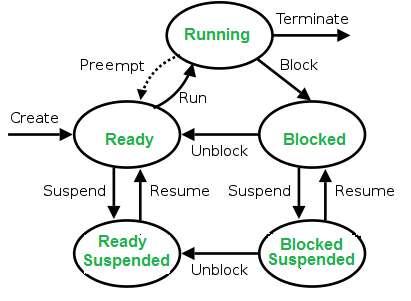
This is how linux operating system manages multiple processes in the machine
- The scheduler prefers to put you back on the same process, mostly due to efficiency (caching, branch prediction etc). The kernel tracks what each process is doing, assigns address space to this process nad each process is assigned a priority.
- nice process:
niceis a program in linux and it directly maps to a kernel call of the same name.niceis used to invoke a utility or shell script with a particular CPU priority, thus giving the process more or less CPU time than other processes. A niceness of -20 is the lowest niceness, or highest priority. The default niceness for processes is inherited from its parent process and is usually 0. statefield of the process descriptor describes the current condition of the process.TASK_ZOMBIE- The task has terminated, but its parent has not yet issued await()system call. The task’s process descriptor must remain in case the parent wants to access it. If the parent calls wait(), the process descriptor is deallocated.
Created
When a process is first created, it occupies the “created” or “new” state. In this state, the process awaits admission to the “ready” state. Admission will be approved or delayed by scheduler.
Ready
- A “ready” or “waiting” process has been loaded into main memory and is awaiting execution on a CPU.
- A ready queue or run queue is used in computer scheduling. Modern computers are capable of running many different programs or processes at the same time. However, the CPU is only capable of handling one process at a time.
- Processes that are ready for the CPU are kept in a queue for “ready” processes. Other processes that are waiting for an event to occur, such as loading information from a hard drive or waiting on an internet connection, are not in the ready queue.
Running
-
A process moves into the running state when it is chosen for execution. The process’s instructions are executed by one of the CPUs. There is at most one running process per CPU or core. A process can run in either of the two modes, namely kernel mode or user mode.
-
Kernel mode: Processes in kernel mode can access both: kernel and user addresses. Kernel mode allows unrestricted access to hardware including execution of privileged instructions. Various instructions (such as I/O instructions and halt instructions) are privileged and can be executed only in kernel mode. A system call from a user program leads to a switch to kernel mode.
-
User mode: Processes in user mode can access their own instructions and data but not kernel instructions and data (or those of other processes). When the computer system is executing on behalf of a user application, the system is in user mode. However, when a user application makes a system call, the system must transition from user to kernel mode to fulfill the request.
-
User mode avoids various catastrophic failures:
- There is an isolated virtual address space for each process in user mode.
- User mode ensures isolated execution of each process so that it does not affect other processes as such.
- No direct access to any hardware device is allowed.
Blocked
- A process transitions to a blocked state when it cannot carry on without an external change in state or event occurring.
- For example, a process may block on a call to an I/O device such as a printer, if the printer is not available.
- Processes also commonly block when they require user input, or require access to a critical section which must be executed atomically.
- Such critical sections are protected using a synchronization object such as a semaphore or mutex.
Terminated
- A process may be terminated, either from the “running” state by completing its execution or by explicitly being killed and moved to the “terminated” state.
- The underlying program is no longer executing, but the process remains in the process table as a zombie process until its parent process calls the wait() system call to read its exit status, at which point the process is removed from the process table, finally ending the process’s lifetime.
- If the parent fails to call wait(), this continues to consume the process table entry and causes a resource leak.
Between the User Space and Kernel Space sits the GNU C Library (glibc). This provides the system call interface that connects the kernel to the user-space applications.
The Kernel Space can be further subdivided into 3 levels:
- System Call Interface: System Call Interface provides an interface between the glibc and the kernel.
- Architectural Independent Kernel Code: Architectural Independent Kernel Code is comprised of the logical units such as the VFS (Virtual File System) and the VMM (Virtual Memory Management).
- Architectural Dependent Code: Architectural Dependent Code is the components that are processor and platform-specific code for a given hardware architecture.
Kernel Threads
A kernel thread is a kernel task running only in kernel mode. Threads name start with k. eg. kworker, kswapd. There are 4 functions useful in context of kernel threads:
-
start_kthread: creates a new kernel thread. Can be called from any process context but not from interrupt. The functions blocks until the thread started. -
stop_kthread: stop the thread. Can be called from any process context but the thread to be terminated. Cannot be called from interrupt context. The function blocks until the thread terminated. -
init_kthread: sets the environment of the new threads. Is to be called out of the created thread. -
exit_kthread: needs to be called by the thread to be terminated on exit. -
It is often useful for the kernel to perform some operations in the background, and the kernel achieves this via kernel threads standard processes that exist solely in kernel-space.
-
Anything with a parent process ID of
0is usually a kernel process, exceptinit, which is a user-level command started by the kernel at boot time. -
The significant difference between kernel threads and normal processes is that kernel threads do not have an address space (in fact, their
mmpointer isNULL) as it is the address space which contains the kernel. -
They operate only in kernel-space and do not context switch into user-space. Kernel threads are, however, schedulable and preemptable as normal processes.
-
Kernel thread can be created only by another kernel thread. The new task is created via the usual
clone()system call with the specified flags argument. On return, the parent kernel thread exits with a pointer to the child’stask_struct. The child executes the function specified by fn with the given argument arg. -
A kernel thread continues executing its initial function forever. The initial function usually implements a loop in which the kernel thread wakes up as needed, performs its duties, and then returns to sleep.
-
kthreaddis a special kernel process on Linux that creates other kernel process, and thus appears as the parent of other kernel daemons. -
A kernel component, which need to run in a process context but isn’t invoked from the context of a user-level process, will usually have its own kernel daemon.
kswapd: pageout daemon. It supports the virtual memory subsystem by writing dirty pages to disk slowly over time, so the pages can be reclaimed.- The
sync_supersdaemon periodically flushes file system metadata to disk. - The
jbddaemon helps implement the journal in the ext4 file system. rpcbindprovides the service of mapping RPC (Remote Procedure Call) program numbers to network port numbers.- The
nfsd,nfsiod,lockd,rpciodare daemons provide support for the Network File System (NFS). rsyslogdcan log system messages of any program. The messages may be printed on a console device and/or written to a file.crondexecutes commands at regularly scheduled dates and times. Numerous system administration tasks are handled by cron running programs at regularly intervals.atd, similar to cron, allows users to execute jobs at specified times, only once.cupsdis a print spooler that handles print requests on the system.sshdprovides secure remote login and execution facilities.pdflushis a daemon which is responsible for flushing dirty data and metadata buffer blocks to the storage medium in the background. Another daemon,kjournald, which sits along sidepdflush, performing a similar task writing dirty journal blocks to disk.- As pages of memory are deemed dirty they need to be synchronized with the data that’s on the storage medium.
bdflushwill coordinate withpdflushdaemons to synchronize this data with the storage medium. - When system memory becomes scarce or the kernel swap timer expires, the
kswapddaemon will attempt to free up pages. So long as the number of free pages remains abovefree_pages_high,kswapdwill do nothing. However, if the number of free pages drops below, thenkswapdwill start the page reclaming process. Afterkswapdhas marked pages for relocation,bdflushwill take care to synchronize any outstanding changes to the storage medium, through thepdflushdaemons.
Process Context vs Interrupt Context
- When the scheduler wants to switch to other prcess, it must save state of currently executing process. When this process is switched back to again, the original state is reloaded. This time delay is callled context switch or scheduling jitter.
- The process and interrupt context is with reference to the kernel execution.
- When kernel is working on behalf of a process or it is running some kernel threads it is said to be executing in process context whereas when the kernel is handling some interrupt handler then it is said to be working in interrupt context.
- When system call is executed, the kernel is said to be “executing on behalf of the process” and is in process context.
- When in process context, the current macro is valid. Upon exiting the kernel when the system call execution is done, the process resumes execution in user-space, unless a higher-priority process has become runnable in the interim, in which case the scheduler is invoked to select the higher priority process.
- There is no process tied to interrupt handlers and consequently no process context, hence there is no one backing to wake it up.

Share this post
Twitter
Facebook
Reddit
LinkedIn
Email