Short Notes: Routing Protocols
Routing Protocols
Interior vs. Exterior Routing Protocols
- Interior Gateway Protocols (IGPs) handle routing within an Autonomous System. Eg. RIP,IGRP,OSPF etc.
- Exterior Gateway Protocols handle routing outside an Autonomous Systems, such as connecting different Autonomous systems, forming the Internet. Eg. BGP.
Distance Vector vs. Link State Protocols
Distance Vector Protocols
- Distance vector protocols use distance to work out the best path for packets within a network.
- These protocols measure the distance based on how many hops data has to pass to get to its destination.
- The number of hops is essentially the number of routers it takes to reach the destination.
- Generally, distance vector protocols send a routing table full of information to neighboring devices. * They require more bandwidth to send on the routing tables and can run into routing loops as well.
Link State Protocols
- In Link state protocols, routers share information with other routers in proximity.
- The route is calculated based on the speed of the path to the destination and the cost of resources. * One of the key differences to a distance vector protocol is that link state protocols don’t send out routing tables; instead, routers notify each other when changes are detected.
- Routers using the link state protocol creates three types of tables; neighbor table, topology table, and routing table. The neighbor table stores details of neighboring routers using the link state protocol, the topology table stores the entire network topology, and the routing table stores the most efficient routes.
Administrative Distance (AD) is a value that routers use in order to select the best path when there are two or more different routes to the same destination from two different routing protocols.
Routing Information Protocol (RIP)
- Uses the concept of distance-vector routing.
- “Routing by rumor”: routers learn the routing information from directly connected neighbors, which in turn may have learned these networks from other neighboring routers.
- Routers learn about the destination networks from neighboring routers through periodic broadcast updates.
- Convergence: stage after a few updates when all routers know all routes of the network.
- Administrative distance: 120
- RIP uses distance vector to select the best route for each destination subnet (caluclated in terms of hops), with the least number of hops to the destination subnet selected as the best route.
- Before sending routing updates, a router adds an initiating metric to every route which it has and increments the metric of incoming routes in advertisements so the listing routers can learn how far destination network is located.
- When a router receives routing updates, it compares them with the routes that it already has in its routing table.
- If the update has information about a route that is not available in its routing table, the router will consider that route as a new route.
- The router will add all new routes in the routing table before updating existing routes.
- If the update has better information for any existing route, the router will replace the old entry with new route information.
- If the update has worse information for any existing route, the router will ignore it.
- If the update has the same information about any existing route, the router will reset the timer for that route in the entry.
RIP timers :
- Update timer : The default timing for routing information being exchanged by the routers operating RIP is 30 seconds. Using Update timer, the routers exchange their routing table periodically.
- Invalid timer: If no update comes until 180 seconds, then the destination router consider it as invalid. In this scenario, the destination router mark hop count as 16 for that router.
- Hold down timer : This is the time for which the router waits for neighbour router to respond. If the router isn’t able to respond within a given time then it is declared dead. It is 180 seconds by default.
- Flush time : It is the time after which the entry of the route will be flushed if it doesn’t respond within the flush time. It is 60 seconds by default. This timer starts after the route has been declared invalid and after 60 seconds i.e time will be 180 + 60 = 240 seconds.
RIPv1:
- Uses broadcast to advertise to its neighbours about networks
- Classful routing protocol, no support for VLSM
- No Authentication
- Supports only IPv4
RIPv2:
- Uses Multicast (224.0.09) to advertise to its neighbours about networks
- Classless routing protocol, supports VLSM
- Supports authentication
- Supports only IPv4
RIPng:
- Uses Multicast (FF02::9) to advertise to its neighbours about networks
- Supports VLSM
- Supports IPv6
Enhanced Interior Gateway Routing Protocol (EIGRP)
-
It is an advanced distance vector routing protocol.
-
Supports classless routing and VLSM, route summarization, incremental updates, load balacing and many other useful features.
-
Routers running EIGRP must become neighbors before exchanging routing information.
-
Each EIGRP router stores routing and topology information in three tables:
- Neighbor table – stores information about EIGRP neighbors
- Topology table – stores routing information learned from neighboring routers
- Routing table – stores the best routes
-
Administrative distance: 90
-
Uses Reliable Transport Protocol (RTP) for sending messages.
-
EIGRP calculates its metric by using bandwidth, delay, reliability and load.
-
EIGPR uses the concept of autonomous systems. Each router inside an autonomous system must have the same autonomous system number configured, otherwise routers will not become neighbors.
-
To establish a neighbor relationships, routers send hello packets every 5 seconds. Hello packets are sent to the multicast address of 224.0.0.10.
-
The following fields in a hello packet must be the identical in order for routers to become neighbors:
- ASN (autonomous system number)
- subnet number
- K values (components of metric)
-
Hold-down timer is, by default, three times the hello interval (15 seconds).
-
Feasible distance (FD) – the metric of the best route to reach a network. That route will be listed in the routing table.
-
Reported distance (RD) – the metric advertised by a neighboring router for a specific route. It other words, it is the metric of the route used by the neighboring router to reach the network.
-
A successor is the route with the best metric to reach a destination. This route is stored in the routing table.
-
A feasible successor is a backup path to reach that same destination that can be used immediately if the successor route fails. These backup routes are stored in the topology table.
-
For a route to be chosen as a feasible successor, the neighbor’s advertised distance (AD) for the route must be less than the successor’s feasible distance (FD).
- WHY?: To gurantee a loop free path. Because if a neighbor is advertising a route with a cost that’s higher than another neighbor’s cost for the same route but less than the routers own cost for that better route, then it’s mathematically impossible for the higher-cost route to have gone through the router once and looped around to have reached it again.
Open Shortest Path First (OSPF)
-
OSPF is a link-state routing protocol.
-
The routers exchange topology information with their nearest neighbors. The next hop address to which data is forwarded is determined by choosing the best end-to-end path to the eventual destination.
-
OSPF has complete knowledge of the network topology allows routers to calculate routes that satisfy particular criteria.
-
Each OSPF router distributes information about its local state (usable interfaces and reachable neighbors, and the cost of using each interface) to other routers using a Link State Advertisement (LSA) message.
-
Each router uses the received messages to build up an identical database called Link State Database (LSDB) that describes the topology of the AS.
-
Each router calculates its own routing table using a Shortest Path First (SPF) / Dijkstra algorithm. This routing table contains all the destinations the routing protocol knows about, associated with a next hop IP address and outgoing interface.
-
The protocol recalculates routes when network topology changes, using the Dijkstra algorithm.
-
OSPF constructs three tables:
- Neighbor Table: Contains all discovered OSPF neighbors.
- Topology Table: Contains the entire topology of the network with all available routers and calculated best and alternative paths.
- Routing Table: Contains the current working best path used for routing data.
-
It provides a multi-level hierarchy (two-level for OSPF) called “area routing," so that information about the topology within a defined area of the AS is hidden from routers outside this area. This enables an additional level of routing protection and a reduction in routing protocol traffic.
-
Area 0 is the main area, also called backbone area, which connects to the outer world. All other areas must connect to Area 0.
-
Area Boarder Routers (ABR): Routers located on the borders of each area connect to more than one OSPF areas. Responsible for summarizing IP addresses of each area and suppressing updates among areas to prevent fault containment.
-
Autonomous System Boundary Router (ASBR): Router that has interfaces connected to one or more OSPF areas, but it also connects to other routing systems such as BGP, EIGRP, Internet and others. An ASBR router normally advertises routes from other routing systems into the OSPF area to which it belongs.
-
Designated Router (DR): A Designated Router is elected by the routers on multi-access segments (e.g Local Area Network), based on its priority (Router ID, priority).
- The DR router performs special functions such as generating Link State Advertisements (LSAs) and exchanging information with all other routers in the same Area.
- Every router in the same Area will create an adjacency with the DR and BDR.
- The DR sends updates to all Area routers using the Multicast address 224.0.0.5.
- All OSPF routers except the DR use Multicast address 224.0.0.6 to send Link State Update (LSU) and Link State Advertisements (LSAs) packets to the DR.
-
Backup Designated Router (BDR): Router that becomes the DR should the existing DR fail. The BDR has the second highest priority (the DR having the highest priority) in the OSPF network. When the BDR becomes a DR, a new election is made to find a new BDR.
OSPF Neighbour States
- DOWN State: Down State is the first OSPF state and means no Hello packets have been received from a neighbor.
- 2-WAY state: This state describes the Bi-Directional communication state, Bi- Directional means that each router has received the other’s Hello packet and that each router can see its own Router ID included within the Hello packet’s neighbor field. When the 2-Way state is complete, the DR and DBR routers are elected.
- EXSTART State: This state specifies that DR and BDR have been elected and master-slave relation is determined. The router with the highest router ID becomes the master and begins to exchange Link State data. Only the Master router is able to increment the sequence number.
- EXCHANGE State: In this state, OSPF routers exchange DataBase Descriptor (DBD) packets. These contain Link State Advertisement (LSA) headers describing the content of the entire Link State Database (LSD). The contents of the DataBase Descriptor (DBD) received by the router are compared with its own Link State Database (LSD) to check if changes or additional link-state information is available from its neighbor.
- LOADING State: In this state, routers exchange full Link State information based on DataBase Descriptor (DBD) provided by neighbors, the OSPF router sends Link State Request (LSR) and receives Link State Update (LSU) containing all Link State Advertisements (LSAs).
- FULL State:Tthe normal operating state of OSPF that indicates everything is functioning normally. In this state, routers are fully adjacent with each other and all the router and network Link State Advertisements (LSAs) are exchanged and the routers' databases are fully synchronized.
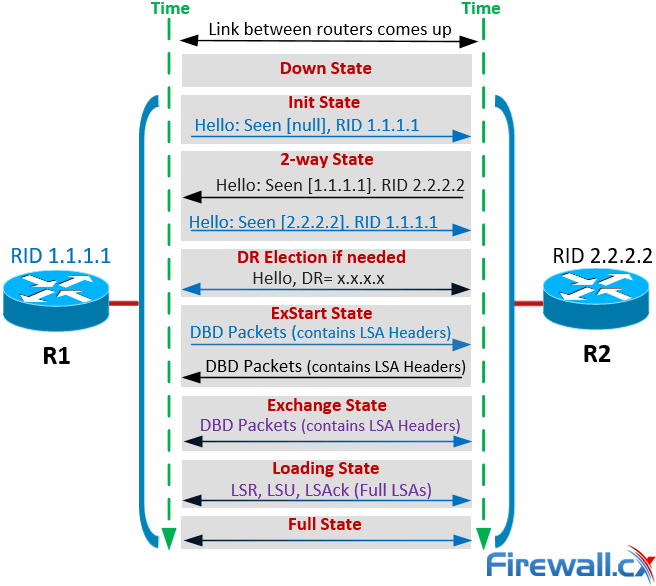
For Broadcast and NBMA media, routers will achieve the Full State with their DR and BDR router only, while for Point-to-point and Point-to-multipoint networks a router should be in the Full State with every neighboring router.
Border Gateway Protocol (BGP)
- Border Gateway Protocol (BGP) is the routing protocol of the Internet, used to route traffic across the Internet.
- BGP chooses a path through the Internet usually by selecting a route that traverses the least number of autonomous systems: the shortest AS path.
- Once BGP is enabled, the router will pull a list of Internet routes from its BGP neighbors, then scrutinize them to find the routes with the shortest AS paths.
- BGP only knows about these paths based on updates it receives.
Route Updates
- BGP does not broadcast its entire routing table.
- Route updates are stored in a Routing Information Base (RIB).
- A routing table will only store one route per destination, but the RIB usually contains multiple paths to a destination.
- It is up to the router to decide which routes will make it into the routing table, and therefore which paths will actually be used.
- In the event that a route is withdrawn, another route to the same place can be taken from the RIB.
- RIB entries never time out. They continue to exist until it is assumed that the route is no longer valid.

Share this post
Twitter
Facebook
Reddit
LinkedIn
Email