Short Notes: Virtualization
A Peek behind VMs and Containers
Virtualization
Virtualization is technology that you can use to create virtual representations of servers, storage, networks, and other physical machines. Virtual software mimics the functions of physical hardware to run multiple virtual machines simultaneously on a single physical machine, increasing the utilization and flexibility of hardware. To the applications running on top of the virtualized machine, it can appear as if they are on their own dedicated machine, even though it is running on just a portion of the actual underlying computer hardware. Each virtualized environment runs within its allocated resources, such as memory, processing power, and storage.
It enables hardware sharing by allowing the creation of a separate computing environment within the same host. It also allows for increased security, as it provides the ability to control the execution of a guest program in a completely transparent manner opens new possibilities for delivering a secure, controlled execution environment.
Virtual machine
A virtual machine is a software-defined computer that runs on a physical computer with a separate operating system and computing resources. The physical computer is called the host machine and virtual machines are guest machines. Virtual machines are abstracted from the computer hardware by a hypervisor.
Hypervisor
The hypervisor is a software component that manages multiple virtual machines in a computer. A hypervisor is a software that enables a server to be logically abstracted and appear to the operating systems running on it as if they are running directly on the hardware itself. The underlying operating systems sees the hypervisor as the actual computer. It ensures that each virtual machine gets the allocated resources and does not interfere with the operation of other virtual machines.
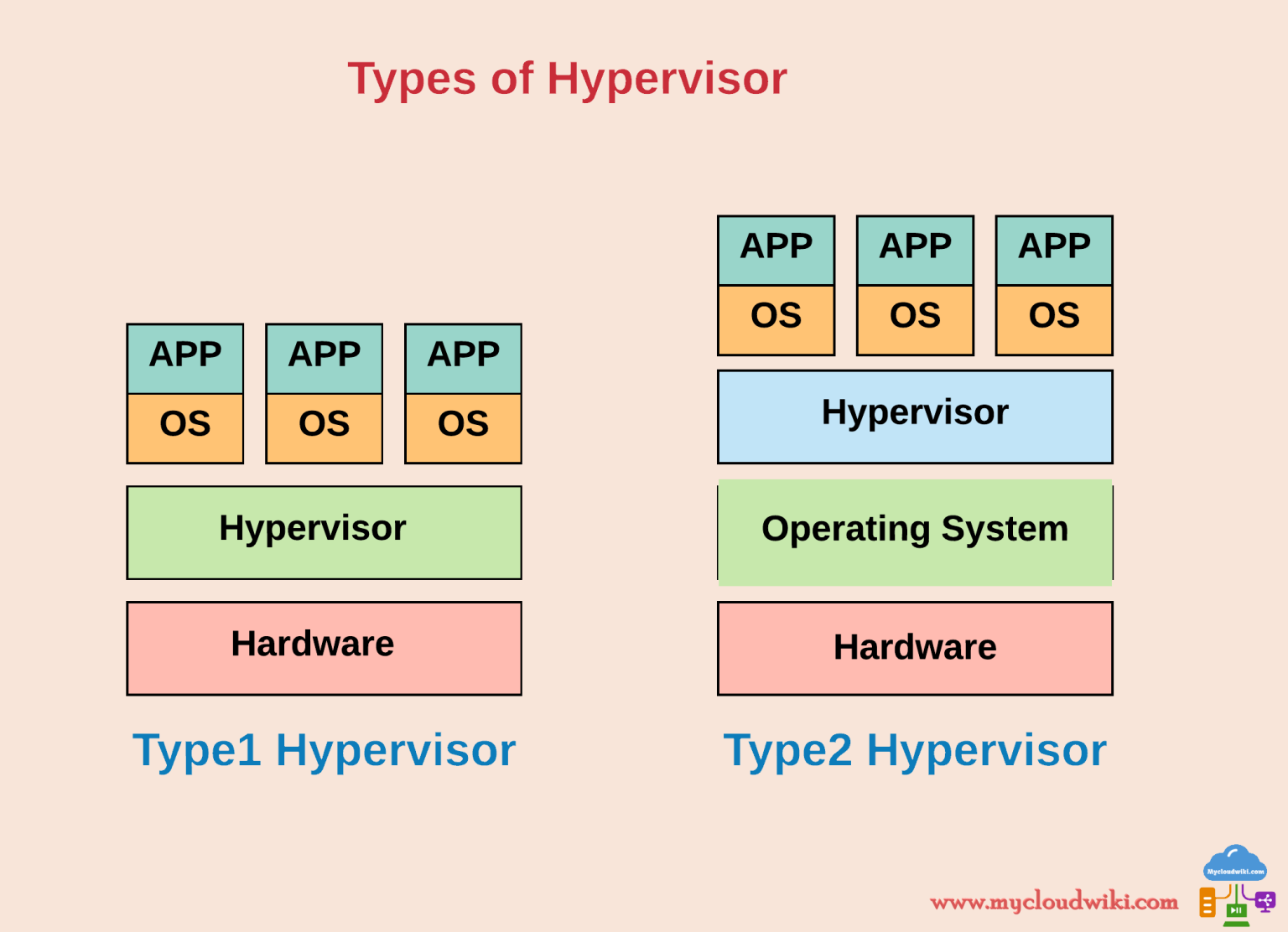
There are two types of hypervisors:
-
Type 1 hypervisor: A type 1 hypervisor, or bare-metal hypervisor, is a hypervisor program installed directly on the computer’s hardware instead of the operating system. Therefore, type 1 hypervisors have better performance, less overhead, and more security and are commonly used by enterprise applications. KVM uses the type 1 hypervisor to host multiple virtual machines on the Linux operating system.
-
Type 2 hypervisor: Also known as a hosted hypervisor, the type 2 hypervisor is installed on an operating system. Type 2 hypervisors are suitable for end-user computing.
Types of Virtualization
Virtualization can be used to get the functions of many different types of physical infrastructure and all the benefits of a virtualized environment. You can go beyond virtual machines to create a collection of virtual resources in your virtual environment.
-
Desktop virtualization: Desktop virtualization allows the users’ OS to be remotely stored on a server in the data center. It allows the user to access their desktop virtually, from any location by a different machine.
-
Network virtualization: Network virtualization is a process that combines all of these network resources to centralize administrative tasks. The following are two approaches to network virtualization:
-
Software-defined networking: Software-defined networking (SDN) controls traffic routing by taking over routing management from data routing in the physical environment. For example, you can program your system to prioritize your video call traffic over application traffic to ensure consistent call quality in all online meetings.
-
Network function virtualization: Network function virtualization technology combines the functions of network appliances, such as firewalls, load balancers, and traffic analyzers that work together, to improve network performance.
-
-
Storage virtualization: Storage virtualization combines the functions of physical storage devices such as network attached storage (NAS) and storage area network (SAN). You can pool the storage hardware in your data center. Storage virtualization uses all your physical data storage and creates a large unit of virtual storage that you can assign and control by using management software. It also streamlines storage activities such as archiving, backup, and recovery, because they can combine multiple network storage devices virtually into a single storage device.
-
Data virtualization: Data virtualization creates a software layer between this data and the applications that need it. Data virtualization tools process an application’s data request and return results in a suitable format.
-
Application virtualization: Application virtualization pulls out the functions of applications to run on operating systems other than the operating systems for which they were designed. For example, users can run a Microsoft Windows application on a Linux machine without changing the machine configuration. To achieve application virtualization, follow these practices:
- Application streaming – Users stream the application from a remote server, so it runs only on the end user’s device when needed.
- Server-based application virtualization – Users can access the remote application from their browser or client interface without installing it.
- Local application virtualization – The application code is shipped with its own environment to run on all operating systems without changes.
-
Data center virtualization: This is the process of creating a virtual data centers, also called a software defined data centers (SDCC) from traditional, physical servers. The process abstracts physical hardware by mimicking its processors, operating system, and other resources with help from a hypervisor.
-
CPU virtualization: Central processing unit (CPU) virtualization is the fundamental technology that makes hypervisors, virtual machines, and operating systems possible. It allows a single CPU to be divided into multiple virtual CPUs for use by multiple VMs. At first, CPU virtualization was entirely software-defined, but many of today’s processors include extended instruction sets that support CPU virtualization, which improves VM performance.
-
GPU virtualization: GPU virtualization lets multiple VMs use all or some of a single GPU’s processing power for faster video, AI and other graphics or math-intensive applications. Pass-through GPUs make the entire GPU available to a single guest OS. Shared vGPUs divide physical GPU cores among several virtual GPUs (vGPUs) for use by server-based VMs.
-
Linux virtualization: Linux includes its own hypervisor, called the kernel-based virtual machine, which supports Intel and AMD’s virtualization processor extensions so you can create x86-based VMs from within a Linux host OS.
-
Cloud virtualization: By virtualizing servers, storage, and other physical data center resources, cloud virtualization can be performed. The providers can offer a range of services, including the following:
- Infrastructure as a service (IaaS): Virtualized server, storage and network resources you can configure based on their requirements.
- Platform as a service (PaaS): Virtualized development tools, databases and other cloud-based services you can use to build your own cloud-based applications and solutions.
- Software as a service (SaaS): Software applications you use on the cloud. SaaS is the cloud-based service most abstracted from the hardware.
Virtualization vs. Containerization
Server virtualization reproduces an entire computer in hardware, which then runs an entire OS. The OS runs one application. That’s more efficient than no virtualization at all, but it still duplicates unnecessary code and services for each application you want to run.
Containers take an alternative approach. They share an underlying OS kernel, only running the application and the things it depends on, like software libraries and environment variables. This makes containers smaller and faster to deploy. This involves encapsulating an application in a container with its own operating environment.
Containerization evolved from a Linux feature known as cgroups. It’s a feature for isolating and controlling resource usage for an operating system process.
cgroups later became Linux Containers (LXC) with more advanced features for namespace isolation of components, such as routing tables and file systems.
Notes about cgroups and namespaces can be found here.

Share this post
Twitter
Facebook
Reddit
LinkedIn
Email